
How to Track Your Workouts: What to Log, App vs. Spreadsheet
By Jordan Hoppel · · Updated · 4 min read
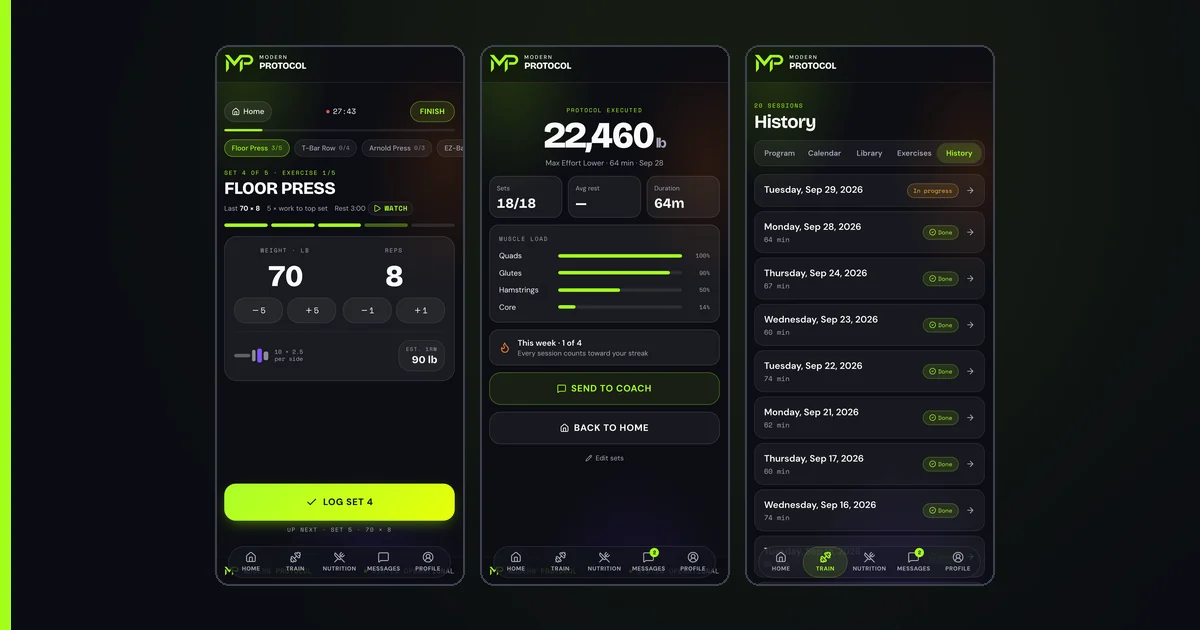
Track what you can act on: sets, reps, rest time, tempo, the lifts used and how you felt. If the weights you move rise on schedule every week, you are getting stronger. Skip what you cannot control, and know that an app beats a spreadsheet on data, organization and built-in calculations.
Tracking only helps if it changes what you do. My rule is to track what you can act on, and to ignore what you can't.
What should you track in a workout?
Track what you can act on next session:
- Sets and reps
- Rest time
- Tempo
- The lifts used
- How you felt that day
- Anything that gives context on the session
Each of these is something you can change next session. Tempo and rest time in particular are levers I use when progress stalls. See progressive overload explained.
What isn't worth tracking?
Anything outside your control.
If it's not in your control it's probably not worth tracking. It will cause more harm than good.
My reasoning: you shouldn't worry about things you can't control.
How do you know you're getting stronger?
If the weights you're moving continually go up according to the schedule and progression you should be following, every single week, you're getting stronger. The test is the plan's own schedule, not how you feel or how sore you are.
For clients who want to measure strength lift to lift, I use a 3-rep or 5-rep max as a proxy instead of a one-rep max, because numbers from higher rep ranges aren't very reliable. See one-rep max percentages explained.
Should you track workouts in a spreadsheet or an app?
An app, for most people. A spreadsheet only wins if you don't want technology around and don't want to be distracted by a phone. On data, organization and capabilities, an app always wins because it has built-in calculations that go far beyond a clunky spreadsheet.
What makes a good lifting app?
I want the programs and intelligence to come from a coach with experience, not a large language model. In my view LLMs have no skin in the game and miss information a coach picks up on. AI is fine for menial, time-consuming tasks and organization.
What annoys me: most legacy lifting apps are like BlackBerry compared to Apple. They're clunky, with legacy settings that aren't customizable, so each person doesn't get a good experience.
Four weeks of one lift
Here is what a clean record looks like for a single lift. The numbers are an example.
| Week | Lift | Sets and reps | Weight | Tempo | Rest | Note |
|---|---|---|---|---|---|---|
| 1 | Squat | 4 x 5 | 205 lb | 3-second lowering | 3 min | Felt good |
| 2 | Squat | 4 x 5 | 210 lb | 3-second lowering | 3 min | Felt good |
| 3 | Squat | 4 x 5 | 215 lb | 3-second lowering | 3 min | Slept 5 hours |
| 4 | Squat | 4 x 5 | 220 lb | 3-second lowering | 3 min | Hard but clean |
The weight rose 5 pounds a week, in line with the beginner jumps in progressive overload explained, while the sets, reps and tempo stayed the same. That is how you can tell the weight is the thing that changed. The note column is where context goes: week 3 shows a short night of sleep, which is a reason to look at recovery if week 4 stalls.
How do you use a workout log to plan the next session?
Read the last session and decide: add weight, repeat the weight, or check recovery. A log is only useful if it changes the next session. One simple way to read it:
- Every planned rep done, form clean: you are on schedule, so add the planned weight.
- A missed rep or a rough session: repeat the weight. One bad day is not a trend.
- The same weight stuck across several sessions: check recovery and technique before adding anything. See what a deload week is and why your squat stopped going up.
Writing down how you felt matters most in that last case. Without it, a stall is a mystery. With it, you can see whether poor sleep or a run of heavy days came first.
A simple log for one session
A useful session note covers the lift, the sets and reps, the weight, the tempo, how long you rested and how you felt. That is enough context to see a progression across 8 to 12 weeks, and it is the same set of items I list above. For why a full block matters, see how long to stick with a workout program.
Frequently asked questions
What should lifters track?
What's pertinent and that you can do something about: sets, reps, rest time, tempo, the lifts used, how you felt that day, and anything that gives context on the session.
What isn't worth tracking?
If it's not in your control it's probably not worth tracking; it causes more harm than good, because you shouldn't worry about things you can't control.
How do I measure getting stronger?
If the weights you're moving continually go up according to the schedule and progression you should be following, every single week, you're getting stronger.
Spreadsheet or app?
A spreadsheet only wins if you don't want technology around and don't want to be distracted by a phone. On data, organization, and capabilities, an app always wins.
What makes a good lifting app?
The programs and intelligence should come from a coach with experience, not a large language model, which has no skin in the game.
New lifting guides every week
Short training clips and the numbers behind them. Follow along or start training free.
Keep reading
Progressive Overload Explained (and What to Do When It Stalls)
Progressive overload in plain terms: add reps first, then weight, how much to add as a beginner, and how to push past a plateau with tempo and pauses.
One-Rep Max Percentages Explained (and When to Test Your Max)
A training percentage is intensity, not effort. See how a 325 lb max turns into working weights, and when a coach tests a true max versus a 3 or 5 rep max.
How to Choose a Workout Program
Three questions a strength coach asks before picking a program, how goals change the training, and the mistakes that send people to the wrong one.